Dashboard AcruxCap Dashboard — 590 stocks, 58 crypto, 25 forex. See the Dashboard →
All Indicators
Now Live on TradingView

Know exactly where
you are in the
trading day.

Sessions By AcruxCap maps every global trading session, key level and higher-timeframe trend onto your chart — so you always know what session is active, which levels matter, and whether the bigger picture supports your trade.

6 Sessions 6 Key Levels DST-Aware Opening Range HTF Dashboard No Repaint
HTF Alignment
▲ Bullish · 1H/4H/D
Sessions · GBP/USD · M5
ASIA 22.7p Closed
LONDON 57.4p LIVE
NEW YORK 34.1p LIVE
Key Levels
PDH1.35695
PDL1.35121
PWH1.35880
PWL1.34210
DST Status
UK BST · Auto-detected
See It In Action

Live on GBP/USD · M5.

Session boxes, key levels, and the live dashboard running on a real chart — showing exactly what you see when you add Sessions By AcruxCap to your TradingView workspace.
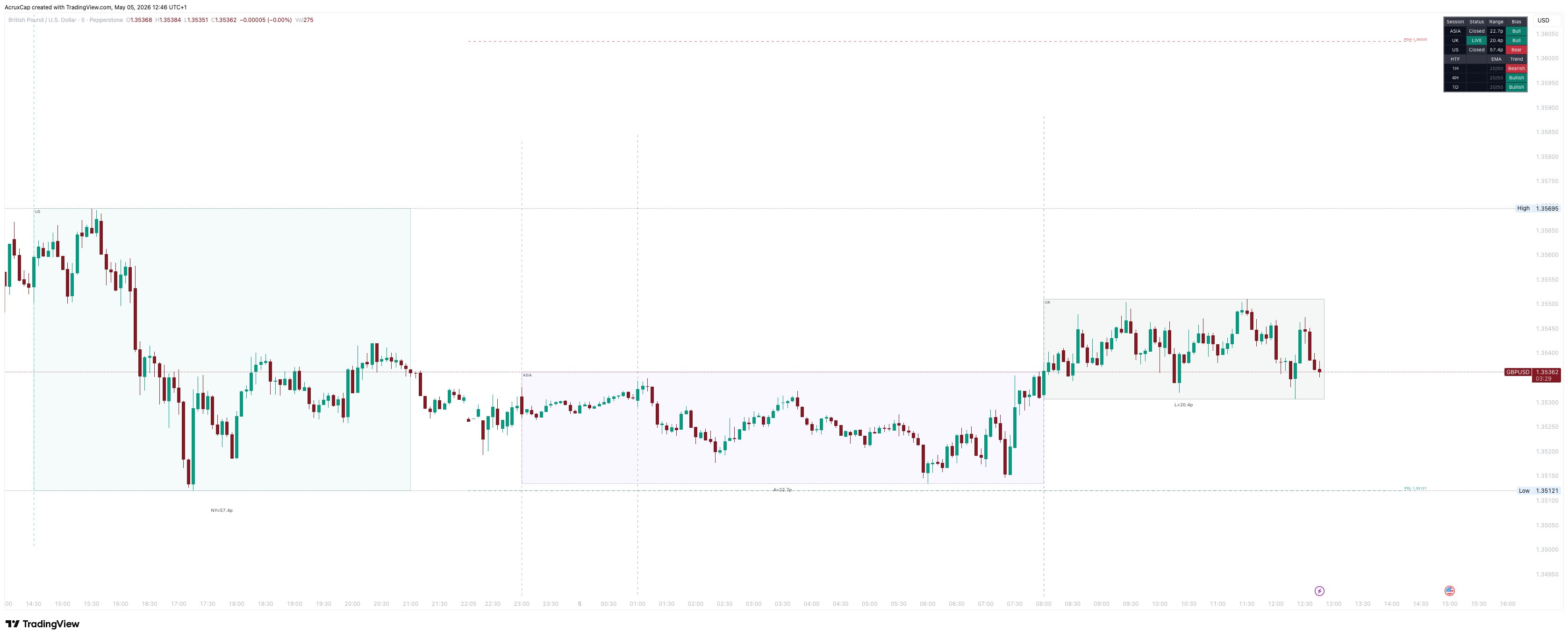
Sessions indicator on GBP/USD M5 showing Asia, London and New York session boxes with pip ranges and HTF dashboard
GBP/USD · British Pound / US Dollar · M5 · Sessions By AcruxCap

Three session boxes visible — Asia (purple), London (slate), and New York (green) — each showing their pip range. The dashboard in the top-right displays session status, directional bias, and HTF EMA alignment across the 1H, 4H, and Daily timeframes.

Session Mapping

Every session. Every market.
One indicator.

Sydney, Tokyo, Asia, Frankfurt, London and New York — mapped directly onto your chart as shaded boxes. You see exactly when each session opened, where its range sits, and how wide it’s been.

Turn sessions on or off with a single click. London, Asia and New York are enabled by default — but if you trade the Sydney open or watch the Frankfurt pre-market, they’re one toggle away.

Every session box shows its pip range live, so you can gauge session volatility at a glance without measuring anything manually.

Sydney22:00–07:00
Tokyo00:00–09:00
Asia00:00–09:00
Frankfurt07:00–08:00
London07:00–16:00
New York12:00–21:00
Key Levels

Previous Day. Previous Week.
Previous Month. Always on your chart.

PDH/PDL, PWH/PWL and PMH/PML are drawn automatically at the start of each new day, week and month. No need to plot them yourself. No need to remember where they were.

When price crosses through a level, it doesn’t just disappear — it fades to a muted style with a ✗ marker. You can still see the level existed and was taken, which matters when you’re reading what happened during a session you weren’t watching.

Show the exact price next to each level. Choose your own colours, line styles and widths. Every level pair is independently customisable.

PDH1.35695
PDL1.35121
PWH1.35880
PWL1.34210
PMH ✗1.36120
PML1.33450
DST Handling

Clocks change.
Your sessions don’t break.

Every session automatically adjusts when the clocks go forward or back. UK BST, US DST, EU summer time and Australian AEDT are all detected and applied — no manual changes, no missed sessions, no misaligned boxes.

Tokyo correctly stays fixed because Japan doesn’t observe daylight saving. We thought of that too.

If you prefer manual control, you can override any session time in the settings.

UK BSTAUTO
US DSTAUTO
EU CET/CESTAUTO
AU AEDTAUTO
Japan (Tokyo)Fixed — no DST
Opening Range

Capture the first move.
Trade the breakout.

The opening range box captures the first 15 minutes of the London and/or New York session — adjustable from 5 to 60 minutes depending on your strategy.

When enabled, the OR high and low extend as horizontal lines through the rest of the session. You can see at a glance whether price is trading above or below the opening range — and when it breaks, you’re ready.

Whether you trade OR breakouts, OR fades, or just use the opening range as context for later entries — the levels are always there.

Opening Range · London
OR Range: 12.3p
07:00 – 07:15 UTC
OR High: 1.35612OR Low: 1.35489
Live Dashboard

Everything you need to know.
One corner of your screen.

A compact dashboard sits in the corner of your chart and tells you: which sessions are live and which have closed, each session’s range in pips, whether each session is bullish, bearish or flat, your key levels and whether they’ve been crossed, and higher-timeframe trend alignment across the 1H, 4H and Daily.

Move it to any corner. Change the text size. It’s designed to give you maximum information with minimum screen real estate.

Dashboard Preview
HTF Bias▲ Bullish
1H EMABullish
4H EMABullish
Daily EMABullish
By The Numbers

Built for serious traders.

6
Global sessions mapped
6
Key levels drawn automatically
3
HTF timeframes tracked
4
DST regions auto-detected
0
Repainting

Part of the AcruxCap 13-indicator suite used by forex, crypto and index traders worldwide.

Comparison

Why traders switch to Sessions By AcruxCap

FeatureTypical Session IndicatorSessions By AcruxCap
Session boxes2–3 sessions6 sessions (Sydney, Tokyo, Asia, Frankfurt, London, NY)
DST handlingManual or noneAutomatic — UK, US, EU and Australian clocks
Key levels (PDH/PDL)Separate indicator neededBuilt in — PDH/PDL, PWH/PWL, PMH/PML
Fade-on-crossNot availableLevels dim when crossed — stays visible
Opening rangeSeparate indicator neededBuilt in — configurable 5–60 min window
Session dashboardNot availableLive status, range, bias and HTF alignment
HTF trend alignmentSeparate indicator neededBuilt in — 1H, 4H, Daily EMA trend
Customisation depthBasic coloursColours, opacity, borders, line styles, widths, positions
FAQ

Frequently asked questions.

What markets does this work on?

Forex, crypto and indices — any instrument available on TradingView. The session boxes are optimised for forex timing, but crypto traders can enable all six sessions for around-the-clock coverage.

What timeframes should I use?

Optimised for M1 to M15 but works on any timeframe. Session boxes are most useful on lower timeframes where individual sessions are visible as distinct ranges.

Does it repaint?

No. The HTF alignment uses confirmed previous-bar values to avoid any repainting. Key levels are drawn at the start of each new period and don’t change.

Does it handle daylight saving time?

Yes — automatically. UK BST, US DST, EU CET/CEST and Australian AEDT are all detected and applied. Japan (Tokyo) correctly stays fixed. You can override to manual times if preferred.

Can I use this alongside other AcruxCap indicators?

Yes. Sessions is designed as a standalone overlay. Run it alongside Scored SMC Structure Overlay, Sweep & Shift or any other indicator in the suite without conflict.

Is this a standalone purchase?

Sessions By AcruxCap is available individually — see pricing on our homepage.

How do I get alerts?

After adding the indicator to your chart, click the alert icon in TradingView and select from the available conditions — session opens and key level touches are all built in.

Can I change the session times?

Yes. Every session time is editable in the settings. The defaults are set for standard UTC-based forex sessions, but you can adjust them to match your broker’s hours.

Get Access

Stop juggling five
indicators for one job.

Sessions By AcruxCap is part of the AcruxCap indicator suite. View pricing →

Subscribe via TradingView · Cancel anytime

Sessions By AcruxCap is a technical analysis tool provided for informational and educational purposes only. It does not constitute financial advice. Trading involves significant risk of loss.

Pairs well with

Stack with these.