Forex Engine runs a 6-point automated checklist that tells you when every condition is aligned for a high-probability intraday forex trade. Daily and 1H bias must agree. Price must be in the correct premium or discount zone on both timeframes. Supply or demand zone present. Session liquidity swept. Kill zone active. When all six align, the dashboard goes green. Your job starts at M1.
Daily and 1H bias aligned, dual premium/discount shading, automated supply and demand zones, session liquidity lines with swept markers, and the 6-point readiness dashboard — running live on a real GBP/USD chart. This is exactly what you see when you add Forex Engine to your workspace.
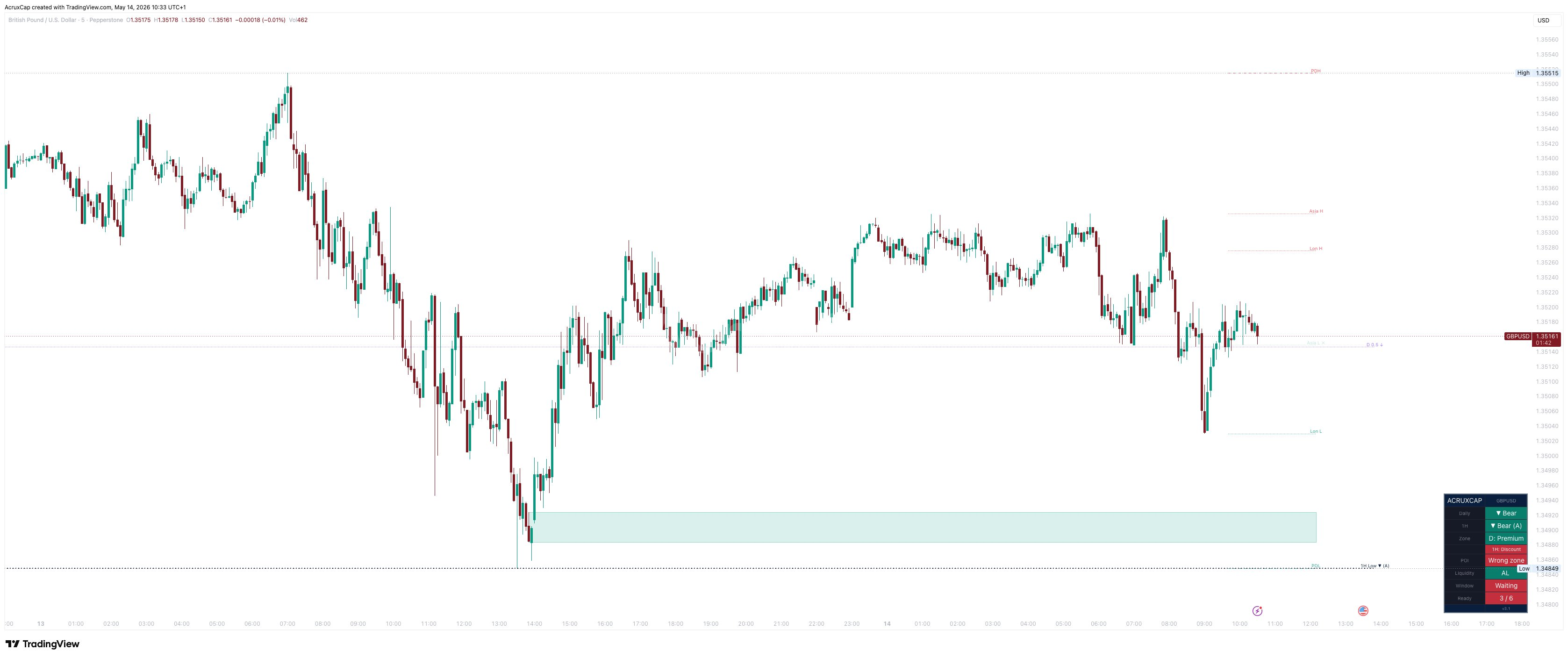
The Daily and 1H ranges are drawn with the 50% equilibrium separating premium and discount on both timeframes. Supply and demand zones auto-draw from impulse origins — supply only in premium, demand only in discount. Session liquidity levels for Asia and London are marked with clean lines; swept levels fade and show a marker. The compact dashboard tracks all six checklist conditions live.
Forex Engine confirms the macro trend from the Daily chart and aligns it with the 1-hour impulse direction. The Daily range is a simple manual input — set the impulse high, low, and direction in settings. It takes 10 seconds and changes maybe once a week.
The 1H range auto-detects using a fractal and ATR engine that confirms swings within 1 pip of a manually drawn Fibonacci. No input needed. When the Daily says Bear and the 1H says Bear, the first two rows go green. If they disagree, there is no trade.
This dual-timeframe alignment is the foundation. The Daily tells you the macro direction. The 1H tells you the intraday impulse. Both pointing the same way is what separates high-probability setups from noise.
Forex Engine calculates the 50% equilibrium on both the Daily and 1H ranges. For sells, price must be above both. For buys, below both. No selling in discount. No buying in premium.
This dual-timeframe zone filter is the single biggest edge the indicator provides. Most losing trades happen because the trader is in the right direction but at the wrong level. If the Daily range says discount but the 1H range says premium, the zones conflict — and the check stays red.
When both timeframes agree that price is in the correct zone for the trade direction, the Zone row goes green. This is a mathematical filter, not discretionary.
Forex Engine detects the origin candle of each impulse move and draws the supply or demand zone automatically. Supply zones only appear in premium. Demand zones only in discount. Zones that would appear in the wrong half of the range are filtered out entirely.
Zones extend with price action and disappear when mitigated — so your chart only ever shows zones that are still relevant. When price is inside an active zone and in the correct area of the range, the S/D row goes green.
This replaces the manual process of drawing supply and demand zones. The indicator draws them exactly where institutional origin candles sit, filtered by the zone context so only high-probability levels appear.
Asia High/Low, London High/Low, and previous day high/low are drawn as clean lines on your chart. When price sweeps a level, it fades and shows a swept marker so you can see at a glance which liquidity pools have been taken.
At least one session level must be swept before the Liquidity row goes green. This confirms that institutional order flow has engaged and the manipulation phase may be underway.
The dashboard tracks all swept levels in real time — showing exactly which ones have been taken. No guessing about whether a sweep happened three hours ago.
High-probability intraday moves originate during the London open and New York open kill zones. Forex Engine identifies whether the current time falls inside these windows.
Session times auto-adjust for UK BST and US DST throughout the year with no manual changes needed. The dashboard shows which kill zone is active or displays “Waiting” if you’re outside both windows.
This is the final gate. All six conditions must align before “ALL GREEN” fires. Outside a kill zone, the framework keeps you on the sidelines even if the other five checks are green.
No order block boxes everywhere. No FVG rectangles cluttering every gap. No BOS or CHoCH labels on every swing. No HH, HL, LH, LL labels. No session boxes. No shading covering the entire chart. No signals telling you when to buy or sell.
The best indicator is the one that shows you exactly what you need and nothing more. If you cannot read price action through the indicator, the indicator is the problem. Forex Engine keeps the chart clean so your eyes can do what they are trained to do.
The framework tells you when to look. The entry execution — that’s your edge.
Most forex indicators pile overlays on your chart. Forex Engine strips everything back to the six things that actually matter before you take a trade.
| Feature | Typical Forex Indicators | Forex Engine |
|---|---|---|
| Chart clutter | OB boxes, FVG, S&D, BOS labels everywhere | Clean — range lines, auto S/D zones in the right half only, one dashboard |
| Directional bias | Single timeframe or lagging MAs | Dual-timeframe — Daily and 1H must agree |
| Zone awareness | None or basic Fibonacci | Dual premium/discount filter — Daily AND 1H ranges checked |
| Liquidity tracking | Static lines with no swept status | Live session H/L + PDH/PDL with faded swept markers |
| Timing | No session awareness | London & NY kill zone gates with auto-DST |
| Trade readiness | You decide based on multiple indicators | 5-point checklist with ALL GREEN alert |
Optimised for major forex pairs — GBP/USD, EUR/USD, and other liquid pairs with clear session-driven liquidity. It works on any forex instrument available on TradingView.
Apply it on the M5 timeframe for the full checklist. The indicator pulls 1H data automatically for the structural range. When all five conditions are green, drop to M1 for your entry confirmation.
No. The 1H state machine uses confirmed close-based structure breaks. Session liquidity levels are drawn at session close and do not change. All values come from confirmed previous-bar data.
Yes — automatically. UK BST and US DST are detected each bar and all session times adjust accordingly. No manual changes needed through the year.
No. Forex Engine is a framework tool. It tells you WHEN conditions are right — the actual entry execution is your skill. It’s designed to keep you out of bad trades as much as it is to find good ones.
Forex Engine is available individually — see pricing on our homepage.
Four alerts: Entered Right Zone (price crosses into the correct premium/discount half), Liquidity Swept (a session level has been taken), Key Window Open (a kill zone has started), and All Green (all five conditions met simultaneously).
Yes. Every session time is editable in the settings. The defaults are set for standard UTC-based forex sessions with auto-DST, but you can adjust them to match your broker’s hours.
Forex Engine by AcruxCap is part of the AcruxCap indicator suite. View pricing →
Subscribe via TradingView · Cancel anytime
Forex Engine by AcruxCap is a technical analysis tool provided for informational and educational purposes only. It does not constitute financial advice. Trading involves significant risk of loss.